
Medivis Viewer Adds Object Tracking for 3D Medical Scans on Vision Pro
The update brings a more hands-on way to explore anatomy, with potential for teaching and explaining complex medical scans.
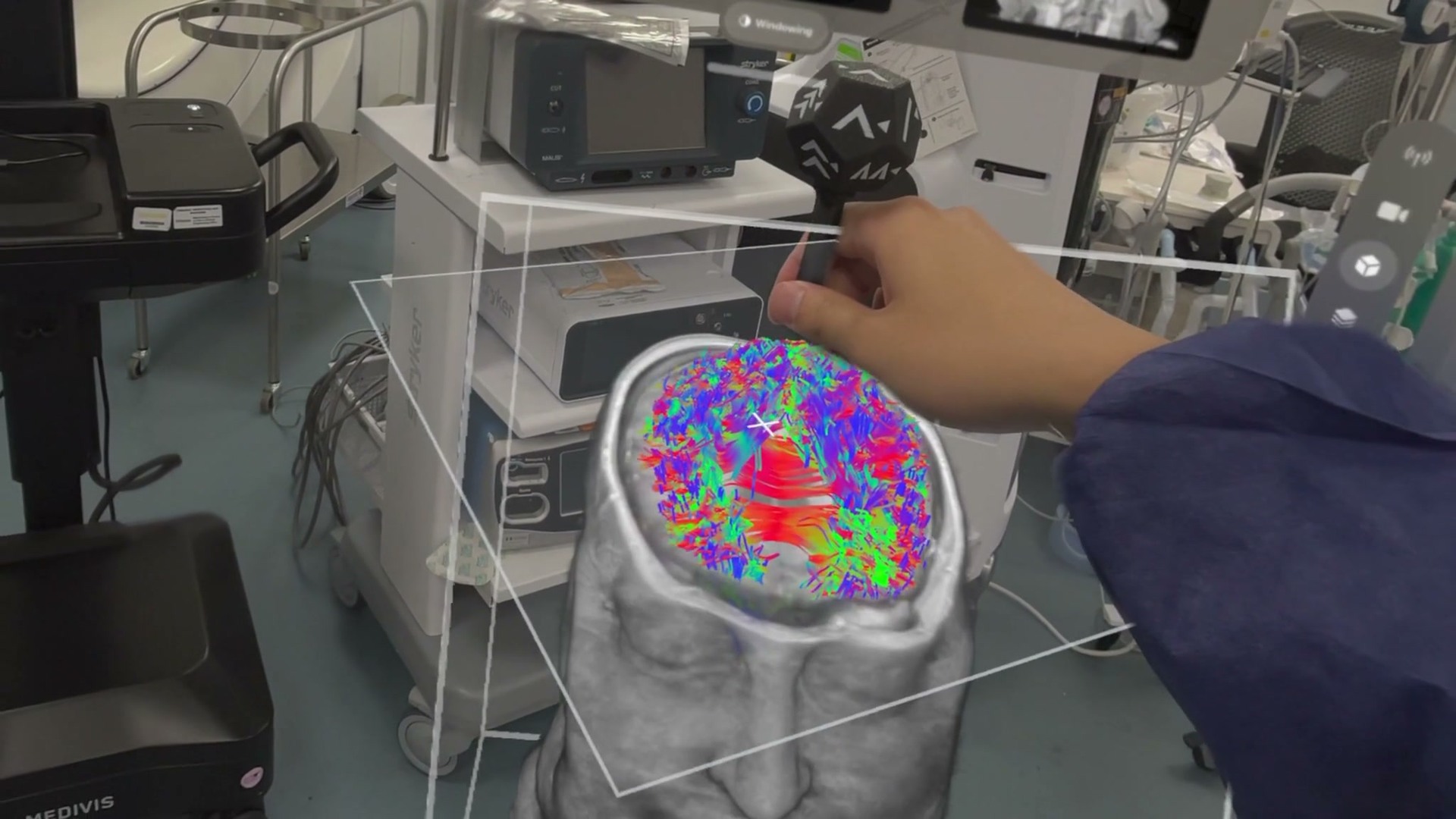
Being able to explore a brain scan in the room with you is a pretty great use for Vision Pro. Medivis Viewer (opens in a new tab) turns medical images into 3D anatomy you can examine from different angles and slice through to see inside.
Version 2.3, released September 26, adds tracking for a physical instrument and improved navigation visuals.
Exploring anatomy
It’s easy to imagine the value for teaching anatomy or explaining a scan. You could point out a structure, show what surrounds it, and give someone a clearer sense of where it sits in the body. For a student learning complex anatomy, the ability to connect a cross-section with the full 3D shape could be especially useful.
The app also supports combined scans and fiber bundles, bringing more of the anatomy into the same 3D view.
Medivis Studio
The app connects to a wider set of medical imaging tools. Medivis Studio (opens in a new tab) lets clinicians load patient scans, isolate structures such as a tumor or blood vessel, and build plans around that anatomy. Vision Pro is an optional way to view those images in 3D. Medivis Viewer can also stream from the company’s SurgicalAR system.
Availability
Medivis states (opens in a new tab) that headset images are for informational purposes and are not intended for primary diagnosis.
Medivis Viewer is free to download (opens in a new tab) for Apple Vision Pro running visionOS 26 or later.
More from Apple Vision Pro.
Browse all stories
Vision Pro · 2 min read
Apple Is Exploring Four Vision Pro Redesigns, Gurman Reports
The N224 project could move computing hardware off the headset to reduce weight, but Apple reportedly has yet to settle on a design.

Immersive cinema · 1 min read
Immersive Warsaw brings filmmakers and creators together on November 5
The in-person event at Kinoteka pairs Apple Vision Pro screenings with filmmaker talks, networking, and an up-close look at Blackmagic’s URSA Cine Immersive camera.
Spatial Capture · 2 min read
How to View Insta360 Spatial Captures on Apple Vision Pro
Paste an Insta360 share link into the PhotoSplat app to step inside your capture, move around, and see it from new angles.