
 Image: Adobe
About the app.
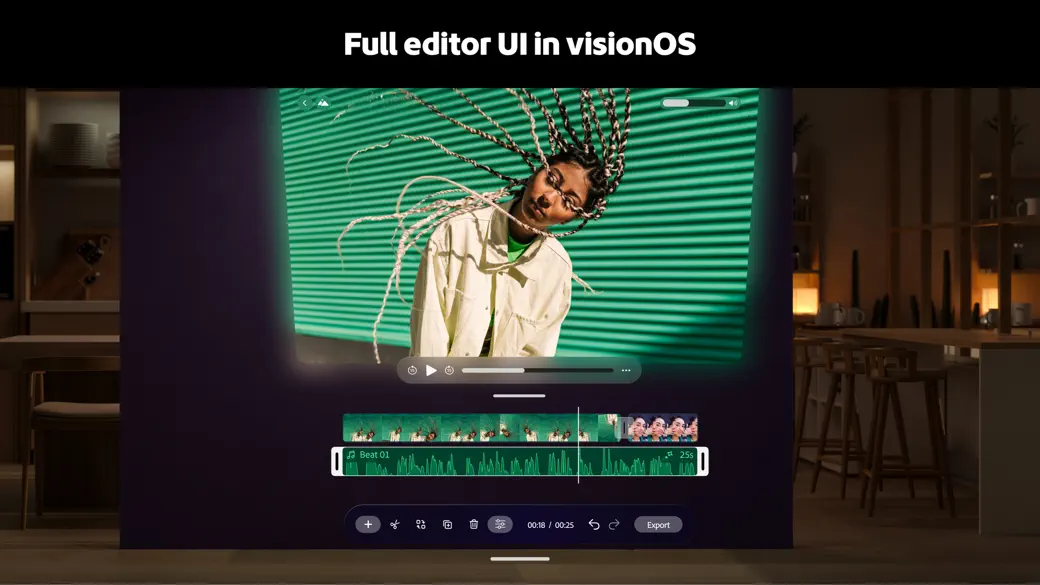
Adobe Premiere brings a multitrack video editor into Vision Pro with panels that can be arranged around the workspace. Familiar trimming, splitting, cropping, captions, voiceover, audio, color, speed, and layer controls support projects from a quick social clip to a more involved edit.
Spatial clips add another dimension to the timeline. Text and images can be placed at different depths, then exported with the project as spatial video so the finished composition preserves more than a flat stack of graphics.
The app is free to begin and does not add ads or a watermark, while some Adobe assets and generative features may involve accounts or credits. It is best for creators who want serious mobile-style editing without leaving the headset’s broader spatial workspace.
Spatial Insider video
See it in use.
App information
Details.
- Price
- Free · In-App Purchases
- Vision Pro support
- Made for Vision Pro
- Developer
- Adobe Inc.
- On visionOS since
- Jul 23, 2026
- First featured
- Jul 23, 2026
More Photo & Video apps.
Browse all apps

Follow Spatial Insider.
Stay up to date.