
CrossView Warp Turns One Video Angle Into a Camera Orbit
The open-source ComfyUI tool uses keyframes and AI to generate a new viewpoint while the action keeps moving.
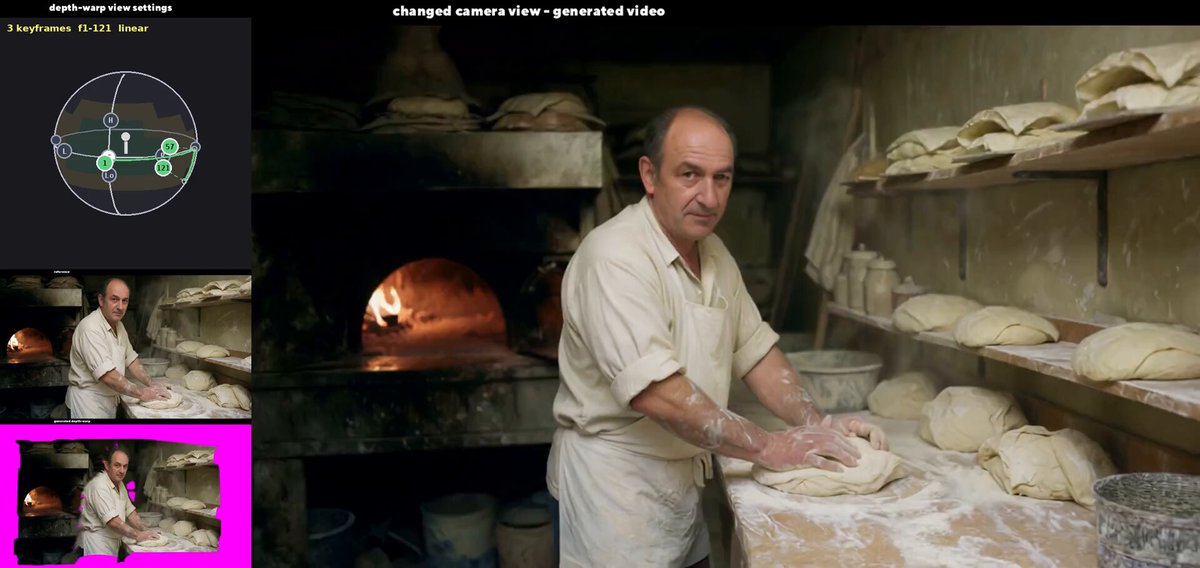
CrossView Warp can take an existing video and give it a new camera move, even though the real camera never changed position.
That means a fixed shot can become an orbit around the subject while the original action keeps moving. For filmmakers and AI video creators, it is a new way to reshape a shot after it was recorded.
Banodoco shared a 10-second demonstration made by Tamas Cseh. A baker keeps working with dough as the generated view moves across the room, revealing more of the oven and shelves around him.
Draw the camera move with keyframes
Cseh built CrossView Warp as a custom node for ComfyUI. Its 3D orbit picker places a virtual camera on a sphere around the subject. You can move to another frame, choose a new position, add a keyframe, and let the tool draw the path between them.
The node then makes a rough depth warp of the original clip from those new angles. Bright magenta gaps mark parts of the scene the real camera never captured. The AI uses that moving geometry as a guide and generates a finished view to fill the frame.
It also keeps the original video as a second reference. One reference carries the shape of the new view. The other helps preserve the people, objects, and motion already in the shot.
V2 rebuilds the original proof of concept
The current CrossView Warp v2 model was trained with 719 scenes Cseh rendered in Blender. Those scenes taught the model how the same action looks from different camera positions. Creators do not need Blender to use it with their own footage.
For a new shot, ComfyUI uses MoGe-2 to estimate its depth. CrossView Warp turns that estimate into the rough new view, and the trained model generates the finished video. V2 also uses the full-resolution warp and trains more parts of the model to follow the requested camera position.
Cseh says angles up to about 45 degrees to either side are the most reliable. Larger moves can work, but looking up from below is still the weakest direction because that view barely appeared in the training data.
The ComfyUI node and CrossView Warp LoRA are available now. Cseh released the LoRA weights under the Apache 2.0 license, while Lightricks applies separate terms to the required LTX-Video base model.
The camera still invents what it cannot see
CrossView Warp is not rebuilding a complete 3D scene or recovering details hidden outside the original frame. It uses depth as a hint and redraws the video from the new angle. At larger rotations, more of the result is invented rather than recovered.
There is also a version detail worth watching. Banodoco describes the new demonstration as using LTX 2.5, but Cseh's current model page and setup instructions identify CrossView Warp v2 as an IC-LoRA for the 22-billion-parameter LTX-Video 2.3 model.
Even with those limits, the demo is seriously fun to watch. Camera direction starts to feel like something you can edit after the shoot, and CrossView Warp gives creators a surprisingly hands-on way to do it.
More from Capture & Create.
Browse all stories
3D mapping · 2 min read
MultiSet Adds 3D Scan Exports for NVIDIA’s Robot Simulator
The latest update also lets devices find nearby maps automatically, combines separate survey scans, and makes mapped spaces shareable in a browser.
AI tools · 2 min read
OpenAI Teases 20+ Launches at DevDay Today
An always-on AI agent and new model access are reportedly on the way, with Sam Altman’s keynote streaming free at 10 a.m. Pacific.

Spatial AI · 2 min read
AMD to Buy World Labs for $8.2 Billion
Fei-Fei Li will become AMD’s chief scientist, bringing the team behind Marble and Atlas closer to the chips that power its research.