
Insta360 X6 Now Available With 8K50 and Spatial Capture
The $699.99 camera adds larger sensors, 120MP photos, longer 8K recording, and an easier way to create Gaussian splats.
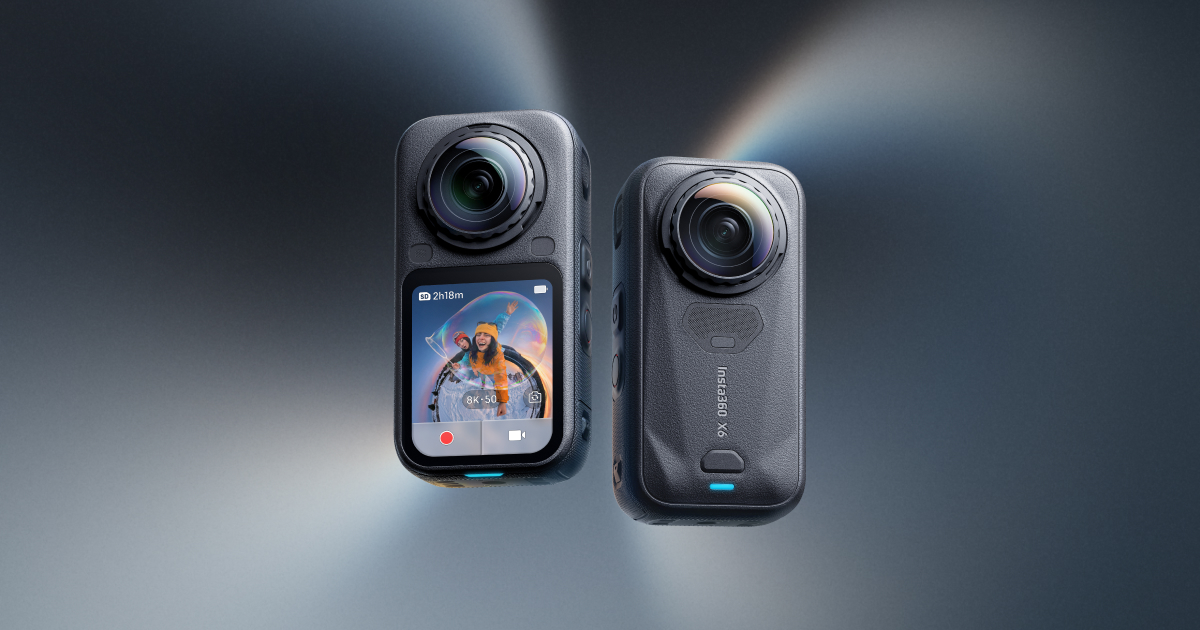
Insta360 has launched the X6, a $699.99 pocket-sized 360 camera that records every direction in 8K at up to 50 frames per second.
That faster 8K mode gives creators more motion to work with before they choose a horizontal, vertical, or moving view from the same recording.
The Insta360 X6 (opens in a new tab) is available now in Midnight Black or Arctic White. The standard bundle includes the camera, one 2,600mAh battery, a USB-C cable, and a protective pouch.
8K gets smoother
X4 brought 8K recording to Insta360’s pocket cameras, and X5 kept it at 30 frames per second. X6 raises that ceiling to 50 fps. More frames can make fast movement look smoother and give an editor more room to slow a moment down.
The resolution still covers the complete sphere around the camera. Once you crop one view out of that sphere, the finished flat shot does not contain the full 8K frame. The advantage is the freedom to point the shot after recording.
X6 uses two custom Sony 1/1.1-inch square sensors, up from the 1/1.28-inch sensors in X5. The numbers look backward, but 1/1.1-inch is actually larger. Insta360 says the new sensors are 33 percent larger and collect more light per pixel, helping X6 capture more detail in dark scenes.
The camera also records 120-megapixel 360 photos and 10-bit video in standard color, I-Log, or Dolby Vision. I-Log keeps more color information available for grading. Dolby Vision does more of that tone work in the camera for a ready-to-watch result.
A separate single-lens mode also turns X6 into a conventional action camera. It records flat video at up to 5K60, while the widest 170-degree view tops out at 5K30.
Longer recording and storage built in
Insta360 rates the new 2,600mAh battery for 140 minutes of continuous 8K30 recording in lab conditions. That is 47 minutes longer than the company’s 93-minute estimate for X5. The 140-minute claim is for 30 fps, not the new 50 fps mode.
X6 weighs 196 grams, four grams less than X5. It also adds 47GB of usable built-in storage and a 2.32-inch OLED screen. Insta360 says the replaceable lenses are five times more scratch-resistant, while a supported 30-watt charger can take the battery from empty to 80 percent in 24 minutes.
X3
- Max 360 video
- 5.7K at 30 fps
- Max 360 photo
- 72MP
- Sensors
- Dual 1/2-inch
- Battery test
- 81 min at 5.7K30
X4
- Max 360 video
- 8K at 30 fps
- Max 360 photo
- 72MP
- Sensors
- Dual 1/2-inch
- Battery test
- 75 min at 8K30
X5
- Max 360 video
- 8K at 30 fps
- Max 360 photo
- 72MP
- Sensors
- Dual 1/1.28-inch
- Battery test
- 93 min at 8K30
X6
Next- Max 360 video
- 8K at 50 fps
- Max 360 photo
- 120MP
- Sensors
- Dual 1/1.1-inch square
- Battery test
- 140 min at 8K30
Battery figures are Insta360 lab estimates. X3 was tested at 5.7K30; X4, X5, and X6 were tested at 8K30.
Spatial Capture turns footage into a place
Spatial Capture is the X6 feature I want to test first. In supported regions, it lets you upload a 360 recording through the Insta360 app and get back a Gaussian splat, a three-dimensional scene you can move through instead of watching from one fixed viewpoint. Insta360 says X6, X5, and X4 currently support the feature in select modes.
The camera does not reconstruct that scene by itself. According to Radiance Fields (opens in a new tab), the Insta360 app sends the capture to an online service for processing, then returns a model that can be explored in the app, through a web link, or on a computer.
Spatial Capture is available in supported regions at launch. Insta360 has not published the complete list of supported modes, pricing or quotas, or every region where the feature works. Its product page says some regions are not supported. Radiance Fields reports that Gaussian splatting will not be available in the United States at launch.
The app can finish the first cut
InstaFrame 2.0 can save a ready-to-share flat 4K clip while keeping an 8K 360 backup for later reframing. Its tracking can follow a person, pet, or object.
The new AI Director runs through the Insta360 app, not entirely inside the camera. Insta360 says its PanoMind model can find highlights, choose angles, and assemble a share-ready clip. The creator can then change the generated edit instead of starting from an empty timeline.
I already use X5 to record every angle and stay in the moment. Some of those 8K recordings live on SpatialInsider360 on YouTube (opens in a new tab), and I also turn X5 footage into Gaussian splats.
X6 is available now for $699.99. I want to start with 8K50 and AI Director, then try Spatial Capture as soon as it is available in the United States.
More from Capture & Create.
Browse all stories
3D Printing · 2 min read
Bambu Lab’s Nine-Tool H3C 3D Printer Gets Its Full Reveal November 3
Bambu’s previews show a lifting tool rack, mixed nozzle sizes, soft TPU, and a sealed AMS 3H system with nine filament slots.
3D Capture · 3 min read
Sony Opens XYN 3D Capture to Individual Creators, With a Free Plan
An iPhone guides your Sony camera as you capture objects and places. Cloud builds use paid tokens, including on the free plan.
Gaussian splats · 3 min read
World Labs Opens Atlas Gaussian Splat Creation in Marble
Creators can turn Atlas views into downloadable 3D scenes, with a new beta API for building splats from generated views or photographs.